PlaceMaker Route Planner
- 3.8
- Rating
- 50.00K
- Installs
- Free
- Price

 Analysis by App-foxy
I usually judge a route-planning app by what happens when a trip becomes slightly complicated: several stops, a tight arrival window, a change of plan, or a need to keep personal choices under control. PlaceMaker Route Planner is aimed at that practical problem rather than simple point-to-point navigation. It is a free Maps & Navigation app from Resting Cranes, and its central appeal is the promise of arranging places into a more useful route instead of treating every destination as a separate journey.
That distinction matters. A normal map app is excellent when I know where I am going and need directions there. A route planner becomes more valuable when I am visiting several addresses and want to think about the order before leaving. In my experience, PlaceMaker is most interesting for errands, local visits, short delivery-style plans, and days when I want to turn a loose list of places into something I can actually follow.
The app is free to install and suitable for Everyone. It has passed the early stage of being a completely unknown download, with over 50 thousand installs, while its average sits at 3.8 from more than 200 ratings and over 50 written reviews. Those figures suggest a modest but real user base rather than a universally polished navigation standard. I would approach it as a focused tool worth testing, not as an automatic replacement for every map app already on my phone.
You May Also Like

 Blood Strike: 2.5 Anniversary
Blood Strike’s Loadouts Turn Every Drop Into a Tactical Gamble
A close look at Blood Strike’s custom loadouts: how fast access to signature weapons reshapes its battle royale rhythm, rewards preparation, and narrows the gap between fights.

 Pandora - Music & Podcasts
Pandora’s Music Is Easy to Start, but Harder to Recover
Pandora’s strength is its low-effort path from a seed to a station. Its weak spot is how much confidence it asks you to place in connection, setup, and quiet recovery.

 8 Ball Pool
 Is Built on Rivalries, Rematches, and Routine
A close look at the rivalries, rematches, shared routines, and unanswered safety questions that turn a quick pool match into a persistent mobile community.

 Samsung Music
’s Quiet Strength Is Playing What You Already Own
Its reach comes less from spectacle than from dependable access to a personal library. That simplicity is both the app’s strongest retention engine and its ceiling.

 AccuWeather: Weather Radar
AccuWeather Review: A Quick, Clear Forecast for Everyday Decisions
For everyday plans, the best forecast is the one you can understand quickly. AccuWeather makes rain timing, radar, and local conditions easy to act on, with a few trade-offs.

 Hill Climb Racing
Why Hill Climb Racing Still Turns Crashes Into One More Run
A tiny car, a bumpy hill and one more upgrade: Hill Climb Racing keeps resurfacing because its simple chaos makes every near-miss feel personal.
More From Our News Desk



What PlaceMaker is trying to solve
The most useful way to understand PlaceMaker is to imagine starting with destinations instead of directions. I might have a pharmacy, a hardware shop, a client meeting, and a parcel drop-off to handle in one outing. Opening a conventional navigation app for each stop can give me accurate individual directions, but it does not necessarily help me decide how the whole outing should flow. A route-planning app is valuable because the planning stage comes first.
That makes the app a better fit for a multi-stop day than for a single commute. If I only need to drive from home to work, the usual map alternative is likely faster and more familiar. If I need to compare several locations, arrange a sequence, and then follow the resulting plan, PlaceMaker has a clearer reason to exist.
The product originally gained attention as a route-planning concept on iOS and is now available on Android. I would not treat that background as proof that it is better than every competing option, but it does explain the app’s positioning: this is not simply another map screen with a search box. The emphasis is on making a set of places manageable.
Resting Cranes keeps the product identity fairly focused. The current version is 1.0.126, which is useful context when deciding how much polish to expect. A focused app can be easier to understand than a huge navigation platform, but it may also feel less comprehensive when I need traffic intelligence, transit depth, offline support, or a mature ecosystem of connected services.
My first planning workflow
I would begin with a small route rather than a full day of travel. Three or four stops are enough to learn whether the app matches the way I think. I would enter places using recognizable names or addresses, check that each result points to the intended location, and then review the order before starting navigation. That last check is important because a route can be technically valid while still being inconvenient in real life.
For example, a shop may close earlier than another stop, a meeting may have a fixed time, or I may want to finish near home rather than simply follow the shortest-looking sequence. Route planning is not only a mathematical exercise. The best order depends on opening hours, appointments, parking, luggage, and personal priorities. PlaceMaker can help organize the route, but I still need to apply common sense before setting off.
A useful habit is to separate “must happen first” stops from flexible ones. I would place the appointment or time-sensitive errand at the center of the plan, then use the remaining destinations to build around it. This prevents me from assuming that the most efficient-looking route is automatically the most practical one.
Where it can save real time
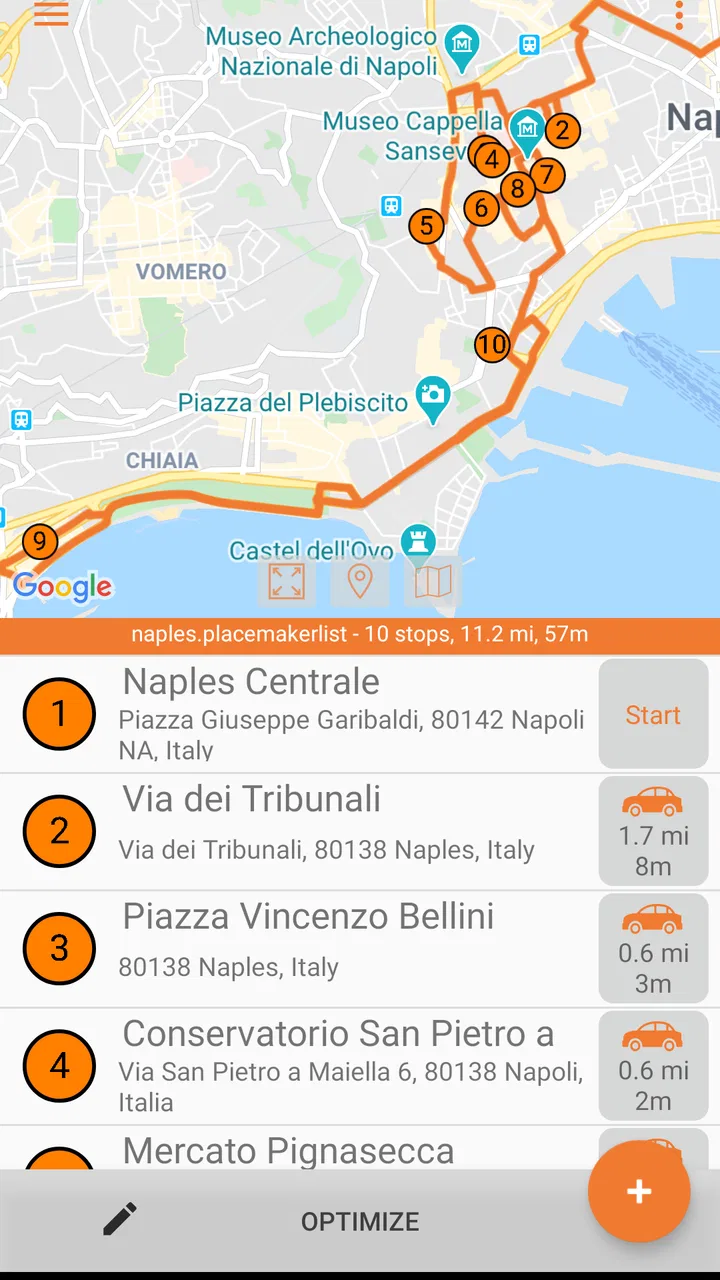
Consider a Saturday morning when I need to collect a prescription, return an item, buy supplies, and visit a relative. Without planning, I might drive past one destination, continue to another, and later cross the same area again. With PlaceMaker, I can prepare the list before leaving, inspect the proposed sequence, and make a deliberate decision about whether the order suits the day.
The benefit is not necessarily that every route will be perfect. The benefit is that the app turns a vague mental list into a visible plan. That reduces the small decisions that otherwise happen while I am already travelling. I can notice an awkward detour before starting rather than discovering it after the first stop.
Another practical use is preparing a route for someone else. If a family member is handling several errands, a clear sequence can be easier to communicate than a collection of separate map searches. I would still review every address personally, especially when place names are similar or a destination has multiple branches.
Trust, controls, and moments that deserve attention
For a navigation app, trust is not only about whether the route looks sensible. Location-related tools can affect privacy, battery use, and the amount of personal information I am willing to share. I therefore prefer to inspect the choices shown during setup and in the device’s app settings instead of assuming that a free app handles data exactly like a major map platform.
PlaceMaker’s visible identity is straightforward: it is made by Resting Cranes, has a general audience rating, and is offered without an upfront purchase. The app also includes optional in-app purchases priced from $4.99 to $17.99 per item. That means “free” should be read as free to obtain, not as a guarantee that every possible capability is included without payment. Before relying on it for regular work, I would check which tools remain available at no cost and what an upgrade changes.
I would also look carefully at any permission prompt. A route planner may need location access for location-aware use, but I would choose the narrowest option that still supports my intended workflow. If I am planning tomorrow’s trip from home, I may not need continuous location access at that moment. If I am already travelling and want live position context, the choice may be different.
My rule is simple: grant only the access that matches the task I am doing now. I would not approve a permission automatically just because the app belongs to the navigation category. Android and iOS both provide system-level controls, and reviewing them gives me more agency than relying on a one-time decision made during installation.
Data-sensitive planning situations
Some destinations reveal more about me than others. A route containing a medical clinic, a support service, a private residence, or a workplace can create a sensitive history on the device or within an account, depending on how the app handles saved places and activity. I would avoid adding sensitive destinations casually while testing the app. A neutral route around public locations is a better first experiment.
When I do enter a private address, I would check whether it remains visible in recent searches, saved lists, or route history and remove it when it is no longer useful. I would also avoid sharing screenshots that expose the complete sequence of stops. A route can disclose more than one destination at once, particularly when it shows a home address alongside a clinic, school, or office.
I would not assume that deleting a route from the screen has the same effect as deleting account information or device history. Those are separate questions. The sensible approach is to inspect the app’s own controls and the operating system’s permissions, then use the available deletion or sign-out choices when appropriate.
This is also where the optional purchase model deserves attention. If I am asked to create an account or provide information before using a paid feature, I would pause and decide whether that exchange is worthwhile for my route-planning needs. A small personal trip does not always justify creating another account, while repeated professional use may make account-based organization more convenient.
How much control the user really has
User agency begins before the route is calculated. I should be able to choose which places belong in the plan, inspect the order, and remove a stop without rebuilding the entire idea in my head. The most important control is not a decorative setting; it is the ability to review the route before I commit to it.
I would treat automated ordering as a suggestion rather than an instruction. If the route places a flexible errand before a time-sensitive appointment, I would change my plan. If it sends me through an area that is difficult to park in, I would weigh convenience over a small distance saving. This is a key trade-off with route planners: optimization can reduce travel while ignoring the human reason behind the trip.
I also prefer to prepare the route while stationary. Entering several places, checking names, and adjusting an order is exactly the kind of activity I should do before driving. Once moving, I would use the app only in a safe, hands-free manner and let the phone’s navigation guidance handle the immediate road decisions where appropriate.
One less obvious tip is to create a route in stages. I would first build the essential sequence, verify it, and only then add optional stops. If a route becomes confusing, I can identify whether the problem came from a wrong address, an unnecessary detour, or too many destinations at once. This staged method is more reliable than entering every possible place and hoping the final arrangement makes sense.
Where competing apps remain stronger
PlaceMaker’s focused purpose is also its main limitation. A large general-purpose map app may be the better choice when I need extensive business information, live traffic context, public transport details, cycling layers, street imagery, or a familiar voice-guided experience. Those alternatives often benefit from a much broader mapping ecosystem and may require less switching between search, planning, and navigation.
On the other hand, a general map app can feel crowded when my only goal is to organize multiple stops. PlaceMaker may be easier to evaluate as a dedicated planning workspace because the route itself is the central object. I would choose it when planning clarity matters more than having every possible map layer in one place.
It is also not the right choice for someone who expects a route to account automatically for every real-world constraint. A calculated sequence may not understand a shop’s queue, a difficult parking situation, a personal accessibility need, or an appointment that starts at a particular time unless the app provides and correctly uses those details. I would keep those factors in my own checklist.
For professional drivers or people managing a large number of daily stops, I would test the app with a realistic workload before paying for anything. The purchase range may be reasonable for a tool that genuinely fits a repeated workflow, but the value depends on whether the available controls match the scale and complexity of the job. A basic personal route and a full working day are very different tests.
Who should try it first
I would recommend trying PlaceMaker to Android users who regularly combine several local errands and want a dedicated way to think through the order. It may also suit travellers preparing a day of visits, families coordinating stops, and anyone who finds repeated one-destination searches frustrating. The free entry point makes a small trial relatively easy, provided I review the purchase prompts and permissions carefully.
I would be more cautious about recommending it as a sole navigation solution. If I need dependable live traffic, deep transit planning, offline confidence, or a mature set of map details, I would compare it directly with the navigation app I already trust. PlaceMaker can occupy the planning stage while another tool handles the final turn-by-turn journey.
That combined workflow may be the most sensible compromise: use PlaceMaker to arrange the places, inspect the sequence, and keep control over the day, then use a familiar navigation service for immediate road guidance if that is where it performs better. It avoids forcing one app to solve every part of travel.
My cautious verdict
PlaceMaker Route Planner has a clear, useful idea behind it. It addresses the gap between “find this destination” and “organize my entire outing.” I like that focus because multi-stop travel is often where ordinary map searches become tedious. The app’s free availability gives me room to test that workflow without committing immediately, while the optional purchases mean I would still examine the feature boundaries before making it part of a regular routine.
My confidence would come from hands-on checks rather than the name of the category. I would verify the displayed addresses, review the route order, inspect permission choices, and remove sensitive destinations when finished. Those habits matter more than assuming that a route planner’s automation understands my personal priorities.
The 3.8 average and the modest number of ratings point to an app with a real audience but not an overwhelming consensus. I read that as a reason to experiment with a small, ordinary route first. If the planning flow feels natural and the controls fit my needs, it could become a useful companion for errands and multi-stop days. If I mainly need instant directions, rich live map information, or highly specialized professional routing, a larger established alternative is likely the safer fit.
In short, I see PlaceMaker as a focused planning tool rather than a universal replacement for maps. Its strongest value is giving me a deliberate route to review before I travel; its biggest trade-off is that I must remain the final decision-maker. For that reason, I would recommend a careful trial, not blind reliance: start with a simple route, check the app’s visible choices, understand what optional purchases unlock, and decide whether its planning approach genuinely improves the way you travel.
FAQs for PlaceMaker Route Planner
01What is PlaceMaker Route Planner used for?
PlaceMaker Route Planner is designed to help users organize and plan routes for trips, deliveries, visits, or other activities involving multiple locations. Instead of checking each destination separately, you can arrange stops in a more practical order and review the complete itinerary in one place. It can be useful for personal travel, field work, business appointments, and anyone who wants a clearer overview before starting a journey.
02Does PlaceMaker Route Planner require an internet connection?
The app may need an internet connection for functions such as loading maps, searching for places, calculating routes, updating location information, or synchronizing saved data. Availability of offline features can depend on the version of the app and the mapping services it uses. If you plan to travel through areas with weak coverage, it is sensible to prepare and save your route in advance rather than relying entirely on a live connection.
03Can I add several stops and optimize their order?
One of the main reasons to use PlaceMaker Route Planner is the ability to work with routes containing multiple destinations. Users can generally enter or select several places, review them together, and arrange the stops to create a more efficient itinerary. The exact optimization options may vary, so you should still check the suggested order carefully, especially when appointments, opening hours, traffic conditions, vehicle restrictions, or personal priorities affect the route.
04Is PlaceMaker Route Planner suitable for delivery drivers and business users?
The app can be helpful for delivery drivers, sales representatives, service technicians, real-estate professionals, and other users who visit multiple locations during the day. A planned sequence can reduce unnecessary backtracking and make a busy schedule easier to follow. However, it should be treated as a planning aid rather than a complete fleet-management system unless your version specifically includes features such as driver tracking, dispatch tools, proof of delivery, or team collaboration.
05Is PlaceMaker Route Planner free to download and use?
The download and available features may depend on the platform, app version, and the developer’s current pricing model. Some route-planning applications offer a free basic experience while reserving advanced tools, larger numbers of stops, exports, or additional map options for paid plans or in-app purchases. Before downloading, review the store listing for subscription details, supported devices, and any limitations so you know what the free version includes.
Pros
- Plans multi-stop routes efficiently for deliveries and errands.
- Supports route optimization to help reduce driving time and fuel use.
- Clear mapping makes stops easy to review before starting a trip.
- Useful for organizing several destinations in one planned journey.
- Can improve consistency for drivers following recurring routes.
Cons
- Advanced planning features may require a paid subscription.
- Route results depend on accurate addresses and current map data.
- Large routes can take time to calculate or adjust.
- May use considerable battery and mobile data during navigation.
- Less useful for simple trips with only one or two destinations.

PlaceMaker Route Planner
Gallery